De NRF24L01 is een draadloze 2,4 GHz transceivermodule voor korte-afstands datacommunicatie tussen microcontrollers. Je sluit hem aan via SPI en gebruikt meestal CE, CSN, SCK, MOSI, MISO, IRQ, GND en een 3,3 V-voeding.
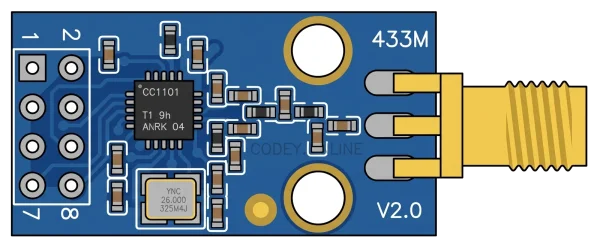
| Pin | Signaal | Beschrijving |
|---|---|---|
GND |
ground | Ground reference for the nRF24L01 module and SPI interface. |
CE |
enable | Chip enable control for RX/TX mode operation, driven by the MCU. |
CSN |
chip-select | Active-low SPI chip select for addressing the nRF24L01. |
SCK |
SCK | SPI clock input from the microcontroller. |
VCC |
power | 3.3V power input for the nRF24L01 radio module; do not connect to 5V. |
MISO |
MISO | SPI data output from the nRF24L01 to the microcontroller. |
MOSI |
MOSI | SPI data input to the nRF24L01 from the microcontroller. |
IRQ |
interrupt | Active-low interrupt output for receive, transmit, or error events. |
| Van | Naar | Draad |
|---|---|---|
board:3.3V |
x1:VCC |
darkorange |
board:GND |
x1:GND |
black |
board:D9 |
x1:CE |
green |
board:D10 |
x1:CSN |
blue |
board:D13 |
x1:SCK |
yellow |
board:D12 |
x1:MISO |
purple |
board:D11 |
x1:MOSI |
cyan |
Dit voorbeeld is geschreven en compile-gecheckt voor de arduino-uno. Codey Online past het voor je aan naar elk ander ondersteund board.
#include <SPI.h>
#include <RF24.h>
// NRF24L01 wiring on Arduino Uno:
// CE -> D9
// CSN -> D10
// SCK -> D13
// MISO-> D12
// MOSI-> D11
// VCC -> 3.3V
// GND -> GND
RF24 radio(9, 10); // CE, CSN
const byte address[6] = "1Node";
void setup() {
Serial.begin(115200);
while (!Serial) {
;
}
Serial.println(F("NRF24L01 basic transmit example"));
if (!radio.begin()) {
Serial.println(F("Radio hardware not responding! Check wiring and 3.3V power."));
while (1) {
delay(1000);
}
}
radio.setPALevel(RF24_PA_LOW);
radio.setDataRate(RF24_1MBPS);
radio.setChannel(76);
radio.openWritingPipe(address);
radio.stopListening();
Serial.println(F("Radio initialized and ready to send messages."));
}
void loop() {
const char message[] = "Hello NRF24L01";
bool ok = radio.write(&message, sizeof(message));
Serial.print(F("Sending: "));
Serial.print(message);
Serial.print(F(" -> "));
Serial.println(ok ? F("success") : F("failed"));
delay(1000);
}
Beschrijf wat je wilt bouwen. Codey Online schrijft de code, tekent het aansluitschema, compileert het en flasht je board rechtstreeks vanuit de browser.
Gratis starten