 Codey
How it works
Send the components
Use Codey catalog ids (exact) or product names (matched for you), plus an optional one-line request and a language.
Codey designs & verifies
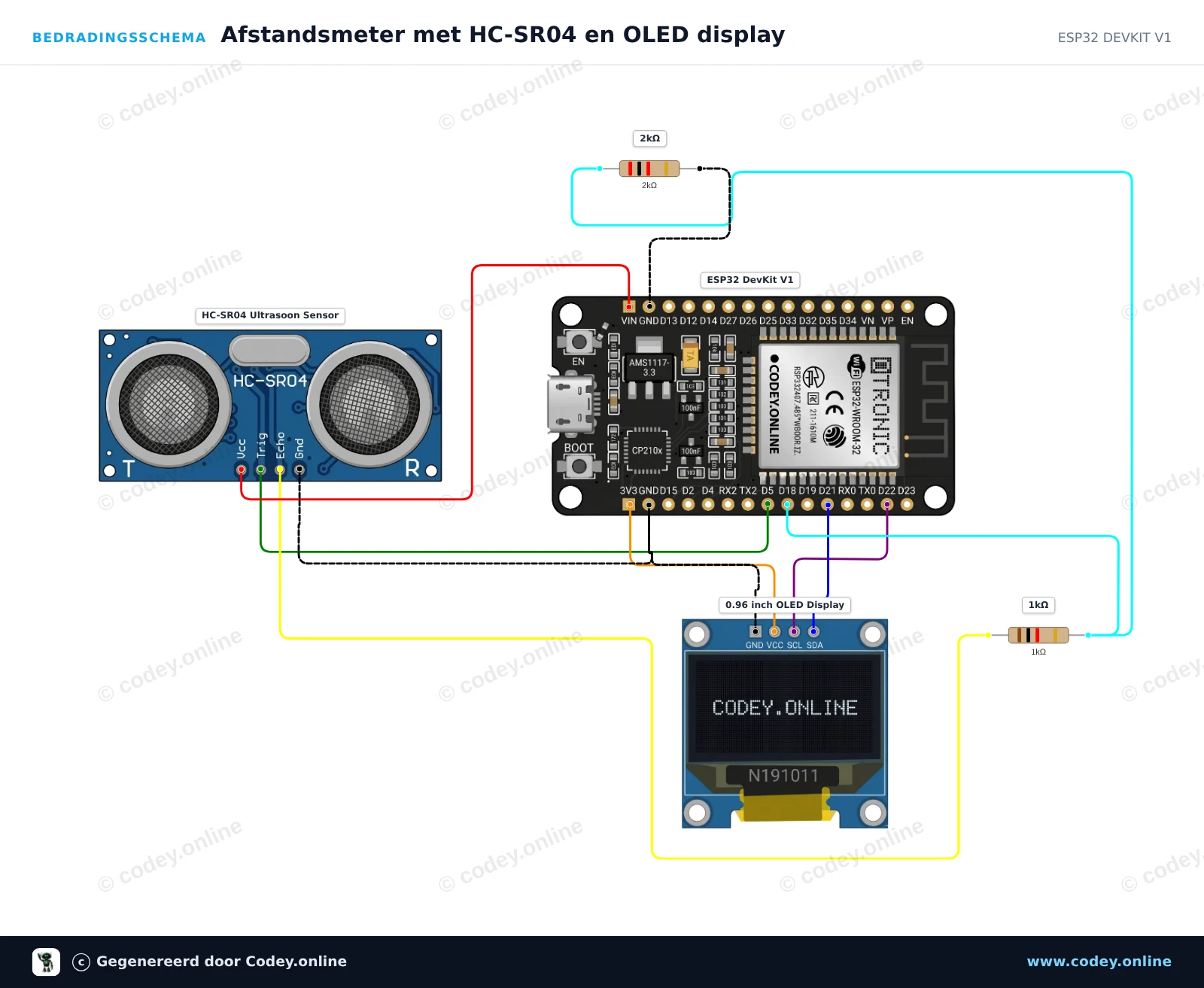
The AI writes a short beginner sketch and draws the wiring. The pin names are checked against the real part and the voltage levels are checked. The sketch is compiled for your board.
Publish the result
You get the sketch, a wiring diagram and a connection table as WebP images, plus a signed webhook when the job is done.
What you get
Connection table
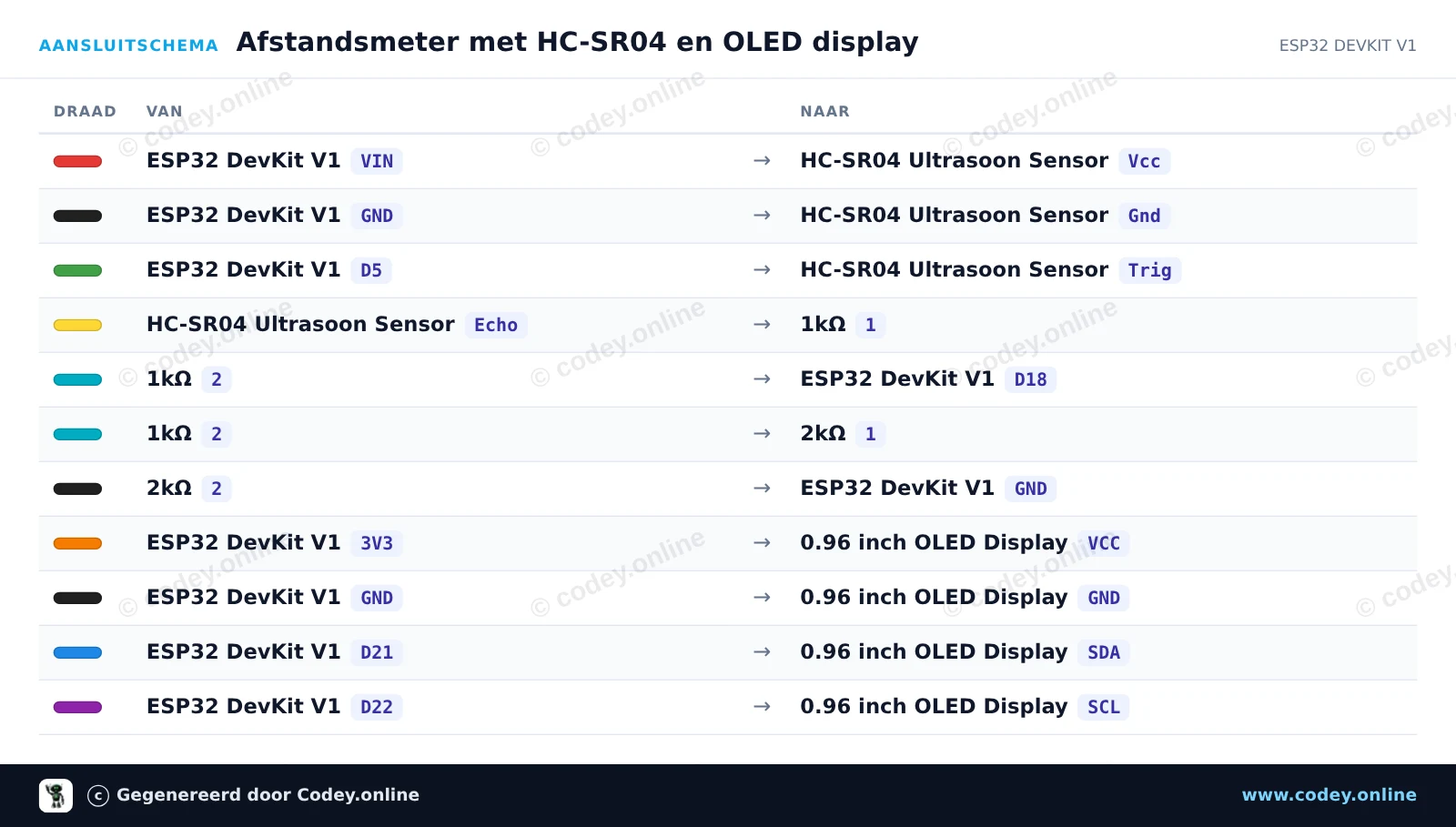
Every wire listed with its colour, from board pin to module pin. It matches the drawing exactly.
Verified example sketch
/*
 * ==================================================================
 *  Gegenereerd door Codey.online  —  https://www.codey.online
 * ==================================================================
 *  Project      : Afstandsmeter met HC-SR04 en OLED display
 *  Bord         : ESP32 DEVKIT V1 (esp32:esp32:esp32doit-devkit-v1)
 *  Onderdelen   : HC-SR04, OLED Display 0.96 inch
 *  Bibliotheken : Adafruit SSD1306 2.5.16, Adafruit GFX Library 1.12.6
 *
 *  Codey Online is een AI-gestuurde browser-IDE voor Arduino en ESP32.
 *  Beschrijf je project en Codey schrijft de code, tekent het
 *  bedradingsschema en zet het direct vanuit de browser op je bord.
 *  Deze code mag vrij gebruikt, aangepast en gedeeld worden, zonder garantie.
 * ==================================================================
 */

#include <Wire.h>
#include <Adafruit_GFX.h>
#include <Adafruit_SSD1306.h>

#define SCREEN_WIDTH 128
#define SCREEN_HEIGHT 64
#define OLED_RESET    -1
#define SCREEN_ADDRESS 0x3C

Adafruit_SSD1306 display(SCREEN_WIDTH, SCREEN_HEIGHT, &Wire, OLED_RESET);

// Pinconfiguratie (ESP32 GPIO nummers)
const int trigPin = 5;
const int echoPin = 18;

void setup() {
  Serial.begin(115200);

  pinMode(trigPin, OUTPUT);
  pinMode(echoPin, INPUT);

  // Initialiseer het OLED scherm
  if (!display.begin(SSD1306_SWITCHCAPVCC, SCREEN_ADDRESS)) {
    Serial.println(F("OLED initialisatie mislukt"));
Every sketch compiles for the chosen board with arduino-cli. Comments are written in your language (EN, NL, DE, FR, ES, IT, PL).
Quick start
curl https://api.codey.online/v1/generations \
  -H "Authorization: Bearer cdy_live_…" \
  -H "Content-Type: application/json" \
  -d '{"board":"esp32-devkit-v1","components":[{"id":"hc-sr04"},{"id":"oled-display-096-inch"}],"language":"en"}'

# → 202 {"id":"gen_…","status":"queued"}  — poll GET /v1/generations/gen_… or wait for the webhook
Same engine as Codey
The images are drawn by the renderer that powers the Codey Online IDE, with real product photos and pin positions.
Safe by default
5V signals are never wired straight into 3.3V pins. Unknown parts are rejected with suggestions rather than guessed, and rejected requests cost nothing.
Made for catalogs
Idempotency keys, your own references, webhooks, test keys and a component matcher make it easy to process a whole assortment.
Pricing
The API is free during the beta for approved webshops, within fair-use limits (100 generations per day). Prepaid credits via Stripe will follow. You will always see the price per generation in GET /v1/account before anything is charged, and failed or rejected generations are never charged.
Attribution
Every image carries a small "© Generated by Codey.online" footer and a subtle watermark. Every sketch starts with a short Codey.online header comment. The code itself is free to use. See the API terms.